# General

## Description

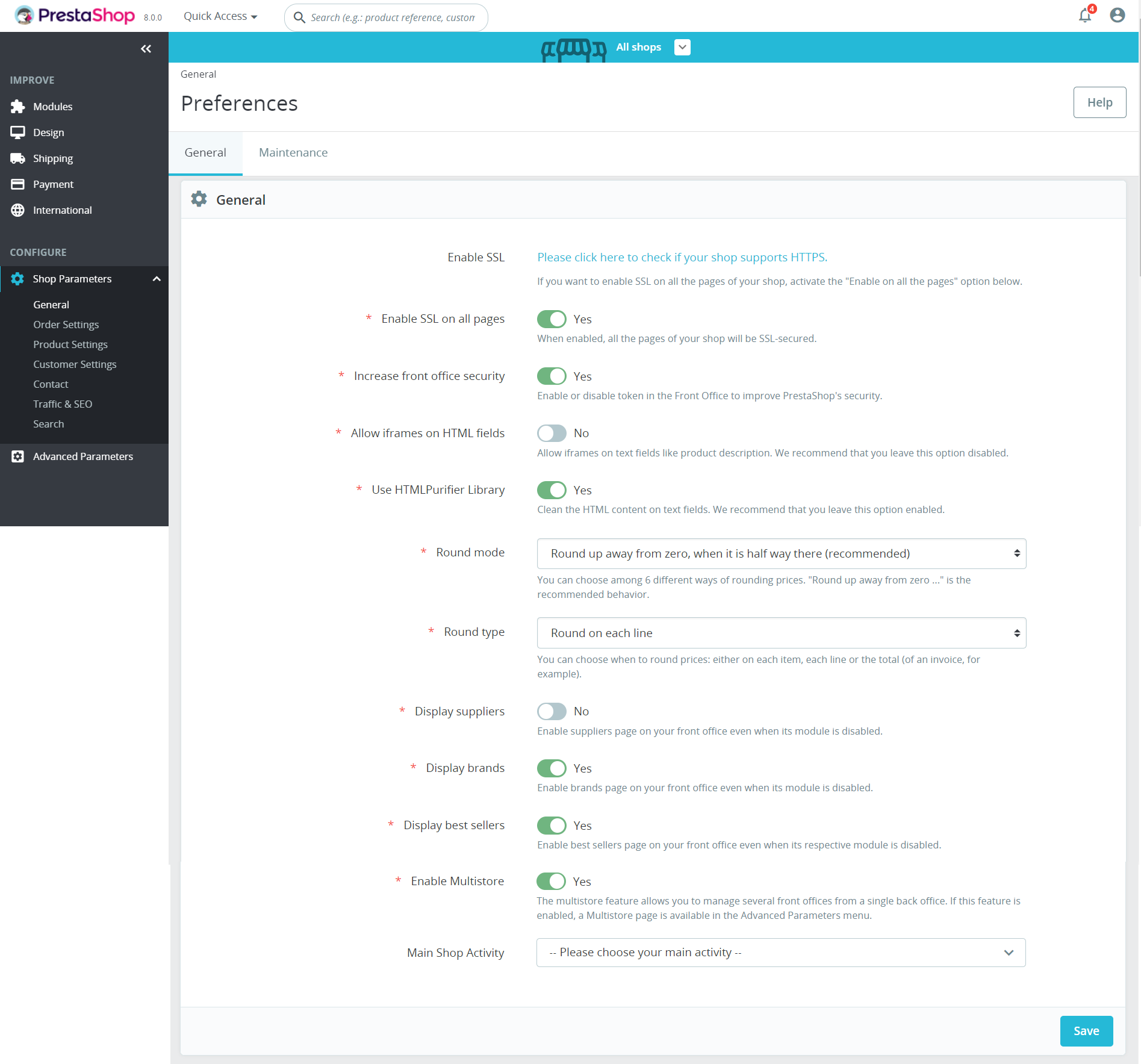
In this page general settings are displayed.

<figure><img src="https://3147996356-files.gitbook.io/~/files/v0/b/gitbook-x-prod.appspot.com/o/spaces%2FeRh5ljXXvELkmmdiRmg8%2Fuploads%2FEBzwoQaYexBDghUDHVYV%2Fimage.png?alt=media&#x26;token=c74b2bc7-da68-443d-b4b8-ca05e583daf1" alt="General User Interface"><figcaption><p>General User Interface</p></figcaption></figure>

## Common components <a href="#common-components" id="common-components"></a>

* [E-commerce logo](https://docs.prestashop-project.org/functional-documentation/functional-documentation/ux-ui/common-components/back-office-header/prestashop-logo).
* [PrestaShop version number](https://docs.prestashop-project.org/functional-documentation/functional-documentation/ux-ui/common-components/back-office-header/prestashop-version-number).
* [Quick access dropdown](https://docs.prestashop-project.org/functional-documentation/functional-documentation/ux-ui/common-components/back-office-header/quick-access-dropdown).
* [Search input](https://docs.prestashop-project.org/functional-documentation/functional-documentation/ux-ui/common-components/back-office-header/search-input-field) - [Forms input with dropdown UI kit](https://build.prestashop-project.org/prestashop-ui-kit/?path=/story/forms--input-with-dropdown).
* Bell icon (todo link)
* [Account icon](https://docs.prestashop-project.org/functional-documentation/functional-documentation/ux-ui/common-components/back-office-header/account-icon).
* [Breadcrumbs navigation](https://docs.prestashop-project.org/functional-documentation/functional-documentation/ux-ui/common-components/back-office-header/breadcrumbs) - [Breadcrumb UI kit](https://build.prestashop.com/prestashop-ui-kit/?path=/story/breadcrumb--breadcrumb).
* [Heading of the page](https://docs.prestashop-project.org/functional-documentation/functional-documentation/ux-ui/common-components/back-office-header/heading-of-the-page) - [Headings UI ](https://build.prestashop.com/prestashop-ui-kit/?path=/story/headings--headings)[kit](https://build.prestashop-project.org/prestashop-ui-kit/?path=/story/headings--headings).
* [Help button](https://docs.prestashop-project.org/functional-documentation/functional-documentation/ux-ui/common-components/back-office-header/help-button) - [Buttons outline UI kit](https://build.prestashop-project.org/prestashop-ui-kit/?path=/story/buttons--outline).
* [Save button](https://docs.prestashop-project.org/functional-documentation/functional-documentation/ux-ui/common-components/forms/save-button) - [Buttons basics UI kit](https://build.prestashop-project.org/prestashop-ui-kit/?path=/story/buttons--basics).

## The UI elements

### Enable SSL link

<table><thead><tr><th>Description</th><th>Value</th><th align="center">Error message</th><th data-hidden></th></tr></thead><tbody><tr><td>Mandatory</td><td>NO</td><td align="center">-</td><td>Error message if not allowed</td></tr><tr><td>Allowed/Forbidden values</td><td>-</td><td align="center">-</td><td></td></tr><tr><td>Default value</td><td>-</td><td align="center">-</td><td></td></tr><tr><td>Help text</td><td>If you want to enable SSL on all the pages of your shop, activate the "Enable on all the pages" option below.</td><td align="center">-</td><td></td></tr><tr><td>Tool tips</td><td>-</td><td align="center">-</td><td></td></tr><tr><td>Lower limit</td><td>-</td><td align="center">-</td><td>Error message if bellow the limit</td></tr><tr><td>Upper limit</td><td>-</td><td align="center">-</td><td>Error message if up to the limit</td></tr><tr><td>Behavior</td><td><a href="#enable-ssl-link-behavior">link to the behavior</a></td><td align="center">-</td><td></td></tr></tbody></table>

### Enable SSL on all pages toggle switch

<table><thead><tr><th>Description</th><th>Value</th><th align="center">Error message</th><th data-hidden></th></tr></thead><tbody><tr><td>Mandatory</td><td>Yes</td><td align="center">-</td><td>Error message if not allowed</td></tr><tr><td>Allowed/Forbidden values</td><td>-</td><td align="center">-</td><td></td></tr><tr><td>Default value</td><td>Yes</td><td align="center">-</td><td></td></tr><tr><td>Help text</td><td>When enabled, all the pages of your shop will be SSL-secured.</td><td align="center">-</td><td></td></tr><tr><td>Tool tips</td><td>-</td><td align="center">-</td><td></td></tr><tr><td>Lower limit</td><td>-</td><td align="center">-</td><td>Error message if bellow the limit</td></tr><tr><td>Upper limit</td><td>-</td><td align="center">-</td><td>Error message if up to the limit</td></tr><tr><td>Behavior</td><td><a href="#enable-ssl-on-all-pages-toggle-switch-behavior">link to the behavior</a></td><td align="center">-</td><td></td></tr></tbody></table>

### Increase front office security toggle switch

<table><thead><tr><th>Description</th><th>Value</th><th align="center">Error message</th><th data-hidden></th></tr></thead><tbody><tr><td>Mandatory</td><td>Yes</td><td align="center">-</td><td>Error message if not allowed</td></tr><tr><td>Allowed/Forbidden values</td><td>-</td><td align="center">-</td><td></td></tr><tr><td>Default value</td><td>Yes</td><td align="center">-</td><td></td></tr><tr><td>Help text</td><td>Enable or disable token in the Front Office to improve PrestaShop's security.</td><td align="center">-</td><td></td></tr><tr><td>Tool tips</td><td>-</td><td align="center">-</td><td></td></tr><tr><td>Lower limit</td><td>-</td><td align="center">-</td><td>Error message if bellow the limit</td></tr><tr><td>Upper limit</td><td>-</td><td align="center">-</td><td>Error message if up to the limit</td></tr><tr><td>Behavior</td><td><a href="#increase-front-office-security-toggle-switch-behavior">link to the behavior</a></td><td align="center">-</td><td></td></tr></tbody></table>

### Allow iframes on HTML fields toggle switch

<table><thead><tr><th>Description</th><th>Value</th><th align="center">Error message</th><th data-hidden></th></tr></thead><tbody><tr><td>Mandatory</td><td>Yes</td><td align="center">-</td><td>Error message if not allowed</td></tr><tr><td>Allowed/Forbidden values</td><td>-</td><td align="center">-</td><td></td></tr><tr><td>Default value</td><td>No</td><td align="center">-</td><td></td></tr><tr><td>Help text</td><td>Allow iframes on text fields like product description. We recommend that you leave this option disabled.</td><td align="center">-</td><td></td></tr><tr><td>Tool tips</td><td>-</td><td align="center">-</td><td></td></tr><tr><td>Lower limit</td><td>-</td><td align="center">-</td><td>Error message if bellow the limit</td></tr><tr><td>Upper limit</td><td>-</td><td align="center">-</td><td>Error message if up to the limit</td></tr><tr><td>Behavior</td><td><a href="#allow-iframes-on-html-fields-toggle-switch-behavior">link to the behavior</a></td><td align="center">-</td><td></td></tr></tbody></table>

### Use HTMLPurifier Library toggle switch

<table><thead><tr><th>Description</th><th>Value</th><th align="center">Error message</th><th data-hidden></th></tr></thead><tbody><tr><td>Mandatory</td><td>Yes</td><td align="center">-</td><td>Error message if not allowed</td></tr><tr><td>Allowed/Forbidden values</td><td>-</td><td align="center">-</td><td></td></tr><tr><td>Default value</td><td>Yes</td><td align="center">-</td><td></td></tr><tr><td>Help text</td><td>Clean the HTML content on text fields. We recommend that you leave this option enabled.</td><td align="center">-</td><td></td></tr><tr><td>Tool tips</td><td>-</td><td align="center">-</td><td></td></tr><tr><td>Lower limit</td><td>-</td><td align="center">-</td><td>Error message if bellow the limit</td></tr><tr><td>Upper limit</td><td>-</td><td align="center">-</td><td>Error message if up to the limit</td></tr><tr><td>Behavior</td><td><a href="#use-htmlpurifier-library-toggle-switch-behavior">link to the behavior</a></td><td align="center">-</td><td></td></tr></tbody></table>

### Round mode dropdown

<table><thead><tr><th>Description</th><th>Value</th><th align="center">Error message</th><th data-hidden></th></tr></thead><tbody><tr><td>Mandatory</td><td>Yes</td><td align="center">-</td><td>Error message if not allowed</td></tr><tr><td>Allowed/Forbidden values</td><td>-</td><td align="center">-</td><td></td></tr><tr><td>Default value</td><td>Round up away form zero, when it is half way there (recommended)</td><td align="center">-</td><td></td></tr><tr><td>Help text</td><td>You can choose among 6 different ways of rounding prices. "Round up away from zero ..." is the recommended behavior.</td><td align="center">-</td><td></td></tr><tr><td>Tool tips</td><td>-</td><td align="center">-</td><td></td></tr><tr><td>Lower limit</td><td>-</td><td align="center">-</td><td>Error message if bellow the limit</td></tr><tr><td>Upper limit</td><td>-</td><td align="center">-</td><td>Error message if up to the limit</td></tr><tr><td>Behavior</td><td><a href="#round-mode-dropdown-behavior">link to the behavior</a></td><td align="center">-</td><td></td></tr></tbody></table>

### Round type dropdown

<table><thead><tr><th>Description</th><th>Value</th><th align="center">Error message</th><th data-hidden></th></tr></thead><tbody><tr><td>Mandatory</td><td>Yes</td><td align="center">-</td><td>Error message if not allowed</td></tr><tr><td>Allowed/Forbidden values</td><td>-</td><td align="center">-</td><td></td></tr><tr><td>Default value</td><td>Round on each line</td><td align="center">-</td><td></td></tr><tr><td>Help text</td><td>You can choose when to round prices: either on each item, each line or the total (of an invoice, for example).</td><td align="center">-</td><td></td></tr><tr><td>Tool tips</td><td>-</td><td align="center">-</td><td></td></tr><tr><td>Lower limit</td><td>-</td><td align="center">-</td><td>Error message if bellow the limit</td></tr><tr><td>Upper limit</td><td>-</td><td align="center">-</td><td>Error message if up to the limit</td></tr><tr><td>Behavior</td><td><a href="#round-type-dropdown-behavior">link to the behavior</a></td><td align="center">-</td><td></td></tr></tbody></table>

### Display suppliers toggle switch

<table><thead><tr><th>Description</th><th>Value</th><th align="center">Error message</th><th data-hidden></th></tr></thead><tbody><tr><td>Mandatory</td><td>Yes</td><td align="center">-</td><td>Error message if not allowed</td></tr><tr><td>Allowed/Forbidden values</td><td>-</td><td align="center">-</td><td></td></tr><tr><td>Default value</td><td>No</td><td align="center">-</td><td></td></tr><tr><td>Help text</td><td>Enable suppliers page on your front office even when its module is disabled.</td><td align="center">-</td><td></td></tr><tr><td>Tool tips</td><td>-</td><td align="center">-</td><td></td></tr><tr><td>Lower limit</td><td>-</td><td align="center">-</td><td>Error message if bellow the limit</td></tr><tr><td>Upper limit</td><td>-</td><td align="center">-</td><td>Error message if up to the limit</td></tr><tr><td>Behavior</td><td><a href="#display-suppliers-toggle-switch-behavior">link to the behavior</a></td><td align="center">-</td><td></td></tr></tbody></table>

### Display brands toggle switch

<table><thead><tr><th>Description</th><th>Value</th><th align="center">Error message</th><th data-hidden></th></tr></thead><tbody><tr><td>Mandatory</td><td>Yes</td><td align="center">-</td><td>Error message if not allowed</td></tr><tr><td>Allowed/Forbidden values</td><td>-</td><td align="center">-</td><td></td></tr><tr><td>Default value</td><td>Yes</td><td align="center">-</td><td></td></tr><tr><td>Help text</td><td>Enable brands page on your front office even when its module is disabled.</td><td align="center">-</td><td></td></tr><tr><td>Tool tips</td><td>-</td><td align="center">-</td><td></td></tr><tr><td>Lower limit</td><td>-</td><td align="center">-</td><td>Error message if bellow the limit</td></tr><tr><td>Upper limit</td><td>-</td><td align="center">-</td><td>Error message if up to the limit</td></tr><tr><td>Behavior</td><td><a href="#display-brands-toggle-switch-behavior">link to the behavior</a></td><td align="center">-</td><td></td></tr></tbody></table>

### Display best sellers toggle switch

<table><thead><tr><th>Description</th><th>Value</th><th align="center">Error message</th><th data-hidden></th></tr></thead><tbody><tr><td>Mandatory</td><td>Yes</td><td align="center">-</td><td>Error message if not allowed</td></tr><tr><td>Allowed/Forbidden values</td><td>-</td><td align="center">-</td><td></td></tr><tr><td>Default value</td><td>Yes</td><td align="center">-</td><td></td></tr><tr><td>Help text</td><td>Enable best sellers page on your front office even when its respective module is disabled.</td><td align="center">-</td><td></td></tr><tr><td>Tool tips</td><td>-</td><td align="center">-</td><td></td></tr><tr><td>Lower limit</td><td>-</td><td align="center">-</td><td>Error message if bellow the limit</td></tr><tr><td>Upper limit</td><td>-</td><td align="center">-</td><td>Error message if up to the limit</td></tr><tr><td>Behavior</td><td><a href="#display-best-sellers-toggle-switch-behavior">link to the behavior</a></td><td align="center">-</td><td></td></tr></tbody></table>

### Enable Multistore toggle switch

<table><thead><tr><th>Description</th><th>Value</th><th align="center">Error message</th><th data-hidden></th></tr></thead><tbody><tr><td>Mandatory</td><td>Yes</td><td align="center">-</td><td>Error message if not allowed</td></tr><tr><td>Allowed/Forbidden values</td><td>-</td><td align="center">-</td><td></td></tr><tr><td>Default value</td><td>Yes</td><td align="center">-</td><td></td></tr><tr><td>Help text</td><td>The multistore feature allows you to manage several front offices from a single back office. If this feature is enabled, a Multistore page is available in the Advanced Parameters menu.</td><td align="center">-</td><td></td></tr><tr><td>Tool tips</td><td>-</td><td align="center">-</td><td></td></tr><tr><td>Lower limit</td><td>-</td><td align="center">-</td><td>Error message if bellow the limit</td></tr><tr><td>Upper limit</td><td>-</td><td align="center">-</td><td>Error message if up to the limit</td></tr><tr><td>Behavior</td><td><a href="#enable-multistore-toggle-switch-behavior">link to the behavior</a></td><td align="center">-</td><td></td></tr></tbody></table>

### Main Shop Activity dropdown

<table><thead><tr><th>Description</th><th>Value</th><th align="center">Error message</th><th data-hidden></th></tr></thead><tbody><tr><td>Mandatory</td><td>Yes</td><td align="center">-</td><td>Error message if not allowed</td></tr><tr><td>Allowed/Forbidden values</td><td>-</td><td align="center">-</td><td></td></tr><tr><td>Default value</td><td>Placeholder: --Please choose your main activity--</td><td align="center">-</td><td></td></tr><tr><td>Help text</td><td>-</td><td align="center">-</td><td></td></tr><tr><td>Tool tips</td><td>--Please choose your main activity--</td><td align="center">-</td><td></td></tr><tr><td>Lower limit</td><td>-</td><td align="center">-</td><td>Error message if bellow the limit</td></tr><tr><td>Upper limit</td><td>-</td><td align="center">-</td><td>Error message if up to the limit</td></tr><tr><td>Behavior</td><td><a href="#main-shop-activity-dropdown-behavior">link to the behavior</a></td><td align="center">-</td><td></td></tr></tbody></table>

## Behaviors description

### Enable SSL link behavior

It is link *Please click here to check if your shop supports HTTPS*, once clicked it redirects from http -> https and all admin pages stay on https. When hover mouse pointer on link it become underlined.

### Enable SSL on all pages toggle switch behavior

This is toggle switch ([Forms switch story UI kit](https://build.prestashop-project.org/prestashop-ui-kit/?path=/story/forms--switch-story)) that allows to enable or disable SSL on all pages.

### Increase front office security toggle switch behavior

This is toggle switch ([Forms switch story UI kit](https://build.prestashop-project.org/prestashop-ui-kit/?path=/story/forms--switch-story)) that allows to enable or disable increase security of front office.

### Allow iframes on HTML fields toggle switch behavior

This is toggle switch ([Forms switch story UI kit](https://build.prestashop-project.org/prestashop-ui-kit/?path=/story/forms--switch-story)) to allow or not iframes on HTML fields.

### Use HTMLPurifier Library toggle switch behavior

This is toggle switch ([Forms switch story UI kit](https://build.prestashop-project.org/prestashop-ui-kit/?path=/story/forms--switch-story)) that allows to enable or disable using of HTMLPurifier Library.

### Round mode dropdown behavior

This is dropdown ([Dropdowns basics UI kit](https://build.prestashop-project.org/prestashop-ui-kit/?path=/story/dropdowns--basics)) to choose round mode. There are these options in dropdown:

* Round up away form zero, when it is half way there (recommended)
* Round down towards zero when it is half way there
* Round towards the next even value
* Round towards the next odd value
* Round up to the nearest value
* Round down to the nearest value

### Round type dropdown behavior

This is dropdown ([Dropdowns basics UI kit](https://build.prestashop-project.org/prestashop-ui-kit/?path=/story/dropdowns--basics)) to choose round type. There are these options in dropdown:

* Round on each line
* Round on each item
* Round on the total

### Display suppliers toggle switch behavior

This is toggle switch ([Forms switch story UI kit](https://build.prestashop-project.org/prestashop-ui-kit/?path=/story/forms--switch-story)) that allows to enable or disable suppliers displaying.

### Display brands toggle switch behavior

This is toggle switch ([Forms switch story UI kit](https://build.prestashop-project.org/prestashop-ui-kit/?path=/story/forms--switch-story)) that allows to enable or disable brands displaying.

### Display best sellers toggle switch behavior

This is toggle switch ([Forms switch story UI kit](https://build.prestashop-project.org/prestashop-ui-kit/?path=/story/forms--switch-story)) that allows to enable or disable best sellers displaying.

### Enable Multistore toggle switch behavior

This is toggle switch ([Forms switch story UI kit](https://build.prestashop-project.org/prestashop-ui-kit/?path=/story/forms--switch-story)) that allows to enable or disable multistore.

### Main Shop Activity dropdown behavior

This is dropdown ([Dropdowns basics UI kit](https://build.prestashop-project.org/prestashop-ui-kit/?path=/story/dropdowns--basics)) with the following options in alphabetical order:

* Animals and pets
* Art and Culture
* Babies
* Beauty and Personal Care
* Cars
* Computer Hardware and Software
* Download
* Fashion and accessories
* Flowers, Gifts and Crafts
* Food and beverage
* HiFi, Photo and Video
* Home and Garden
* Home Appliances
* Jewelry
* Lingerie and Adult
* Mobile and Telcom
* Services
* Shoes and accessories
* Sport and entertainment
* Travel

## Multistores functionality

[Multistores dependent](https://docs.prestashop-project.org/functional-documentation/functional-documentation/ux-ui/common-components/multistore-component/multistores-dependent) page. Some settings works only in all shops context.
